Geometry Dash Guide: Game Modes, Update 2.2 & Pro Tips
Geometry Dash is RobTop Games' rhythm-based platformer, released in 2014. This guide explains all eight classic game modes plus Platformer Mode, the key features of Update 2.2, and the minor updates through 2.208. It also covers a step-by-step practice method, the difficulty ratings and rewards, and the basics of the level editor.
Geometry Dash is a rhythm-based action platformer by RobTop Games, first released on December 22, 2014. You guide an icon through levels packed with spikes, saws, and portals, and every jump is timed to the music. One mistake sends you back to the start — which is exactly why players keep coming back.
What Is Geometry Dash?
At its core, Geometry Dash is a one-button game. You tap, click, or press a key to jump or fly, and the level scrolls forward automatically. The challenge comes from precise timing, pattern memorization, and reading the level while moving at high speed.
The game is available on:
- Steam (Windows and Mac)
- Android (Google Play)
- iOS (App Store)
- Browser — since April 2026, the official GeometryDash.com site lets you play the first level, Stereo Madness, for free
There is also Geometry Dash Lite, a free mobile version with a limited set of official levels and no access to the full online level library or editor.
Geometry Dash Game Modes Explained
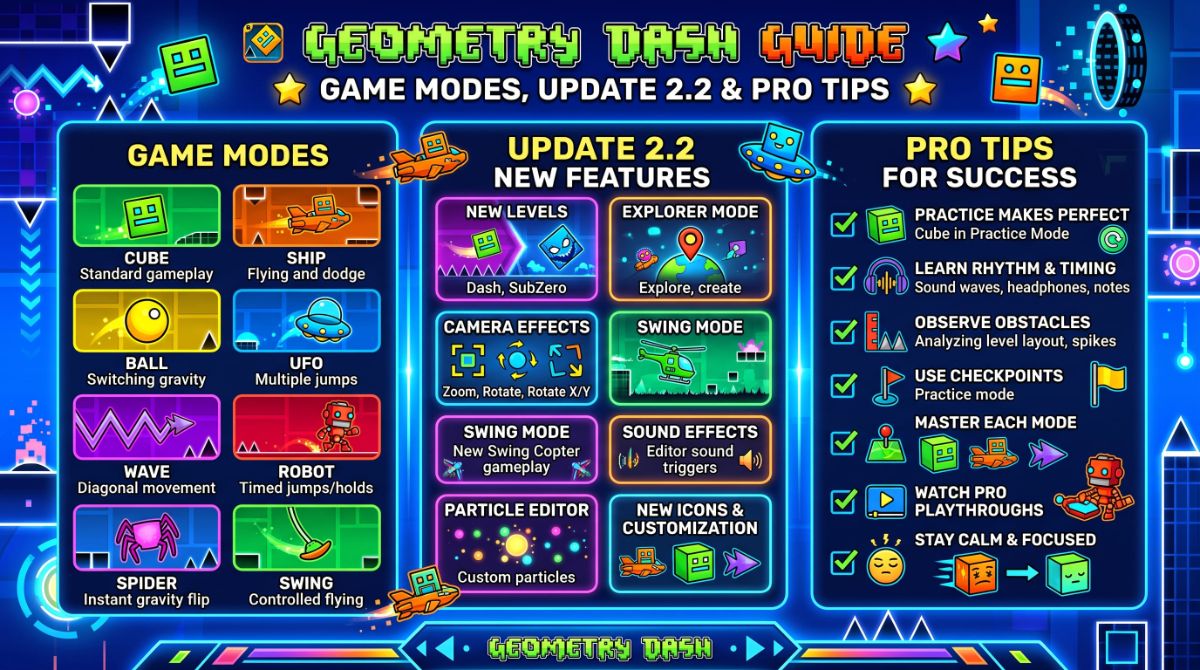
Portals switch your icon between different game modes. Each mode has its own physics and control style, so mastering all of them is the key to beating harder levels.
Classic Game Modes
- Cube — the default mode. Tap to jump; hold to keep jumping on landing.
- Ship — hold to fly upward, release to fall. Requires smooth, controlled inputs.
- Ball — tap to flip gravity between floor and ceiling.
- UFO — tap for a small mid-air boost, similar to a flappy-style jump.
- Wave — hold to move diagonally up, release to move diagonally down. Often the hardest mode for beginners.
- Robot — hold longer for a higher jump.
- Spider — tap to instantly teleport to the opposite surface.
- Swing — added in Update 2.2. Tap to flip gravity while flying, creating a swinging motion.
Platformer Mode
Platformer Mode arrived in Update 2.2. Instead of auto-scrolling, you move left and right freely. It comes with its own reward currency, Moons, and four official levels: The Tower, The Sewers, The Cellar, and The Secret Hollow.

Update 2.2 and What Changed Since
Update 2.2 launched on December 19, 2023 (Steam) and December 20, 2023 (Android and iOS). It was the longest wait between major updates in the game's history — nearly seven years after Update 2.1.
Key Features of Update 2.2
- New Swing game mode and a green gravity portal
- Platformer Mode with Moons as rewards
- 86 new editor triggers, including camera controls, shaders, and a keyframe animation system
- Lists — player-made level collections; developer-approved lists reward Diamonds
- Two new shops: the Mechanic and the Diamond Shop
- Legendary and Mythic ratings above Epic
- An FPS option on Steam with physics that behave the same regardless of frame rate
Minor Updates After 2.2
- 2.201–2.205 (January 2024): Practice Mode for Platformer levels, coyote time, hitbox view, fast menus, new Gauntlets.
- 2.206 (June 2024): NCS songs added to the Music Library (1,200+ tracks) and Windows 64-bit performance improvements.
- 2.207 (November 2024): Event Levels, event chests, and a new Secret Room.
- 2.208 (January 2026): Click Between / On Steps for more precise inputs, leaderboards for Moons, Demons, and User Coins, new Gauntlets, and a trace system in the editor.
A later follow-up patch tweaked Click Between / On Steps and added performance improvements and bug fixes. [Internal link suggestion: Knox Hub post on game patch notes or update trackers]
How to Get Better at Geometry Dash
Progress in Geometry Dash comes from structured practice, not endless random attempts. Here is a proven approach.
Use Practice Mode the Right Way
- Open the level and switch to Practice Mode.
- Place checkpoints before every difficult section.
- Repeat each section until you pass it several times in a row.
- Run the full level in practice without dying.
- Switch to Normal Mode and attempt the full run.
Build a Daily Training Routine
A simple, repeatable routine helps you track progress. Copy this template into your notes app:
GEOMETRY DASH PRACTICE LOG
Date: ____________
Target level: ____________   Difficulty: ____________

WARM-UP (10 min)
- 3 easier levels you already beat
- Focus mode: ______ (wave / ship / ball ...)

MAIN SESSION (30 min)
- Section practiced: __% to __%
- Clean passes in a row: __ / 5
- Best Normal Mode run: __%

COOL-DOWN (5 min)
- Notes on what caused deaths:
  1. ____________
  2. ____________

NEXT SESSION GOAL: ____________
Quick Tips for Faster Progress
- Learn the music. Many jumps line up with the beat, so listening helps timing.
- Enable hitbox view in Practice Mode to understand exactly why you died.
- Try Click Between Steps (added in 2.208) if your inputs feel inconsistent.
- Take breaks. Fatigue leads to sloppy inputs and frustration.
- Train weak modes separately. Search online levels focused on a single mode, such as wave or ship.
Difficulty Ratings and Rewards
Levels are rated by difficulty, from Auto and Easy up to Insane and the five Demon tiers. Completing rated levels earns rewards:
- Stars — earned from classic rated levels
- Moons — earned from rated Platformer levels
- Diamonds and Diamond Shards — spent in the Diamond Shop
- Mana Orbs — spent at shops like the Mechanic
- Coins — hidden collectibles in official and user levels
Rewards unlock icons, colors, trails, and death effects to customize your character. [Internal link suggestion: Knox Hub guide on game progression systems]
The Level Editor and Community
The level editor is what keeps Geometry Dash alive after more than a decade. Players have uploaded a massive library of custom levels, from beginner-friendly stages to extreme Demons.
Why the Editor Matters
- Unlimited content — new levels appear daily, plus a Daily Level and Weekly Demon.
- Advanced triggers — since 2.2, creators can control the camera, add shaders, and build full platformer adventures.
- Community events — Gauntlet contests and the annual Geometry Dash Awards. The 2026 Awards are planned for January 2027.
Getting Started as a Creator
- Open Create from the main menu and start a new level.
- Pick a song from the Music Library or Newgrounds.
- Build the gameplay first, then add decoration.
- Verify the level by beating it yourself.
- Upload it and share the level ID with the community.
[Internal link suggestion: Knox Hub tutorial on level design basics]
FAQ
Is Geometry Dash free?
The full version is paid on Steam, Android, and iOS. Geometry Dash Lite is free on mobile, and the first level can be played free on GeometryDash.com.
What is the latest version of Geometry Dash?
The latest numbered minor update listed on the official wiki is the 2.208 line (including 2.2081), part of Update 2.2.
How many game modes are there?
There are eight classic modes: cube, ship, ball, UFO, wave, robot, spider, and swing — plus Platformer Mode.
Next Steps
- Download the full game or try Stereo Madness in your browser.
- Beat the official levels in order to learn every game mode.
- Start the practice log template above and track your progress for one week.
- Try one Daily Level and one Gauntlet to explore community content.
Want to share your first Demon clear or swap practice tips? Join the discussion in Knox Community, where players trade level recommendations and strategies. [Internal link suggestion: Knox Community gaming forum]